
Best Premium Laptops for Productivity & Multitasking in India 2026
varsha October 6, 2026 0 COMMENTS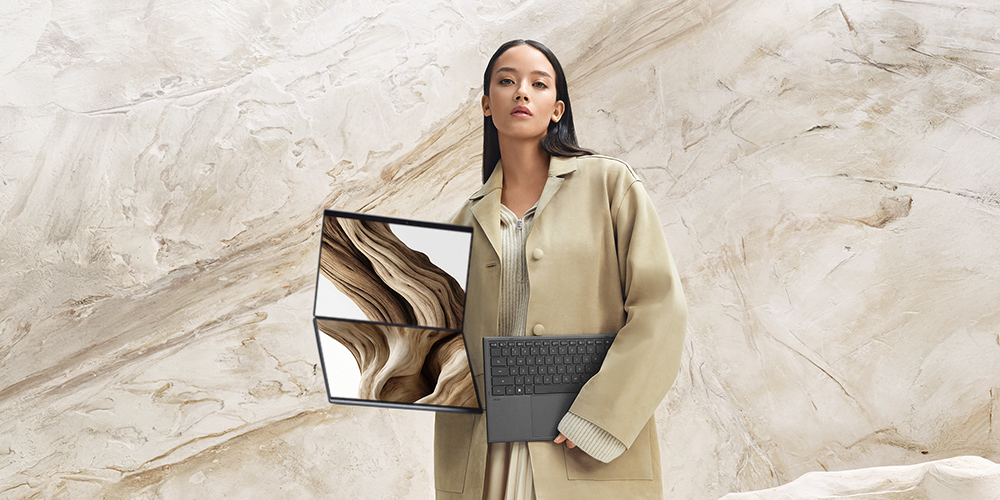
Work today means juggling many things at once. Emails, spreadsheets, video calls and browser tabs all open together. For this kind of daily grind, a regular laptop often struggles. That’s where a premium laptop makes a real difference.
It gives you speed, a smooth screen and enough power to handle heavy multitasking without slowing down. This guide covers the top premium laptop models, what to look for and how to pick the right one for your needs in 2026.
Top premium laptops for productivity & multitasking
ASUS Zenbook Duo UX8407AA-SN183WS (Copilot+ PC)
If you want a laptop that truly changes how you multitask, the ASUS Zenbook DUO is a dual-screen laptop built for exactly that. With two OLED displays, a sturdy Ceraluminum build and long battery backup, it’s made for creators, professionals and anyone juggling multiple windows at once. It blends power with portability, making it one of the most versatile premium laptops you can buy in 2026.
| Spec | Details |
| Processor | Up to Intel® Core™ Ultra 7 Processor 355 (up to 4.7 GHz, 8 cores, 8 Threads) |
| Graphics | Intel® Graphics |
| NPU | Up to Intel® NPU with 49 TOPS |
| RAM | Up to 32GB LPDDR5X |
| Storage | Up to 1TB M.2 NVMe™ PCIe® 4.0 SSD |
| Display | 35.56 cm (14″) 3K (2880 x 1800) OLED Touch, 144Hz, 16:10 |
| Price | ₹299,990 |
Disclaimer: Prices are subject to change, kindly visit the product website for actual costing.
ThinkPad X1 Carbon Gen 13 Aura Edition
The ThinkPad X1 Carbon is a premium laptop built for people who travel often and need something light without giving up power. It weighs less than a kilogram, yet packs strong performance, a sharp OLED display and long battery life. With solid build quality and useful AI features, it fits well into a busy work routine on the move.
| Spec | Details |
| Processor | Up to Intel® Core™ Ultra 7 268V vPro (P-cores up to 5.00 GHz) |
| Graphics | Up to Intel® Arc 140V integrated GPU |
| RAM | Up to 32GB LPDDR5X-8533MT/s |
| Storage | Up to 1TB SSD M.2 2280 PCIe Gen4 |
| Display | 35.56 cm (14″) 2.8K (2880 x 1800) OLED, HDR 500, VRR 30-120Hz |
| Price | ₹2,95,491 |
Disclaimer: Prices are subject to change, kindly visit the product website for actual costing.
Dell Pro 16 Plus Laptop
The Dell Pro 16 Plus is a business laptop built for everyday office work. It comes with a spacious display, a roomy keyboard and enough power to handle emails, spreadsheets and video calls without trouble. Its design keeps things simple and functional, which makes it a dependable pick for people who need a work laptop that just works.
| Spec | Details |
| Processor | Up to Intel® Core™ Ultra 5 236V vPro (8 cores, up to 4.7 GHz) |
| Graphics | Intel® Arc integrated graphics |
| RAM | Up to 16GB LPDDR5x |
| Storage | Up to 512GB SSD |
| Display | 16″, Non-Touch, FHD+, 300 nit, Anti-Glare |
| Price | ₹166,203 |
Disclaimer: Prices are subject to change, kindly visit the product website for actual costing.
What makes a laptop good for productivity & multitasking
Not every laptop is built the same way. A few key specs decide whether it can truly handle multitasking.
- Processor: A strong CPU is the heart of any premium laptop. It helps run multiple apps and browser tabs without lag.
- RAM: 16GB is a good start. If you work with heavy files or many programs, 32GB gives extra room to breathe.
- Storage: SSD storage loads apps faster and handles large files smoothly. 512GB to 1TB works well for most users.
- Display: A sharp screen, whether FHD, QHD or OLED, makes it easier to view documents, spreadsheets and windows side by side.
- Battery life: Long battery hours matter if you work from cafes, while traveling or in meetings all day.
- Build and weight: A good laptop should feel solid but still be light enough to carry around comfortably.
- Ports: USB-C, Thunderbolt and WiFi 6 support help you connect monitors, drives and other devices without hassle.
When these specs come together, you get a machine that feels fast, stable and ready for anything your workday throws at it.
How to choose the right one for you
Picking the right laptop depends on how you actually use it.
- For office or remote work: Look for a light laptop with a good keyboard and long battery life. You’ll be typing and video calling a lot.
- For creators and designers: Choose one with a strong processor, more RAM and a sharp display. Editing photos or videos needs extra power.
- For students: A balance of good battery life, decent RAM and a comfortable screen size works best for switching between notes, research and assignments.
- For frequent travelers: Go for something light in weight with a strong battery backup, so you’re not stuck near a charging point all day.
Think about your daily tasks first, then match the specs to those needs. This way, you avoid overpaying for power you won’t use or underbuying and slowing yourself down.
Final thoughts
Picking the right laptop really comes down to knowing how you work day-to-day. A good, well-built premium laptop can save you hours of frustration and keep things running smoothly. If you want something a bit different, check out a dual-screen laptop like the ASUS Zenbook DUO. It lets you work on two screens at once, which is very helpful if you use a lot of apps at once. No matter what laptop you pick, make sure it works with the way you work, not just how it looks.

Latest Articles
 What Does ICL Mean in Texting? Meaning, …In Social Media
- What Does Igh Mean in Text? Decode This …In Social Media
- What Does GNG Mean in Texting? 2 Meaning…In Social Media
- Buying a Used Car? Your Insurance Quote …In Insurance
- TW Meaning in Chat: Why Is Everyone Usin…In Social Media
- What Does WYFF Mean? Slang Meaning, Text…In Social Media
- Health Insurance Premium Estimator: What…In Insurance
- Gonzay.com: The Complete Guide to Guest …In Digital Marketing