Minesweeper has been a favorite puzzle game for decades, challenging players to uncover safe tiles while avoiding hidden mines. Today, you can enjoy the classic experience instantly with the Minesweeper Google Doodle, playable directly in your browser on desktop or mobile. This interactive version keeps the logic-based challenge of the original game while offering a clean, responsive interface for all players. Whether you’re a longtime fan or discovering Minesweeper for the first time, this guide will help you learn how to play, understand the numbers, explore strategies, and even access unblocked versions online for uninterrupted fun.
What Is the Minesweeper Google Doodle?
It is an online adaptation of the classic logic puzzle game. Unlike traditional Google Doodles that celebrate events, this interactive version appears directly in search results when you type “Minesweeper.” You can start playing instantly without installing any software.
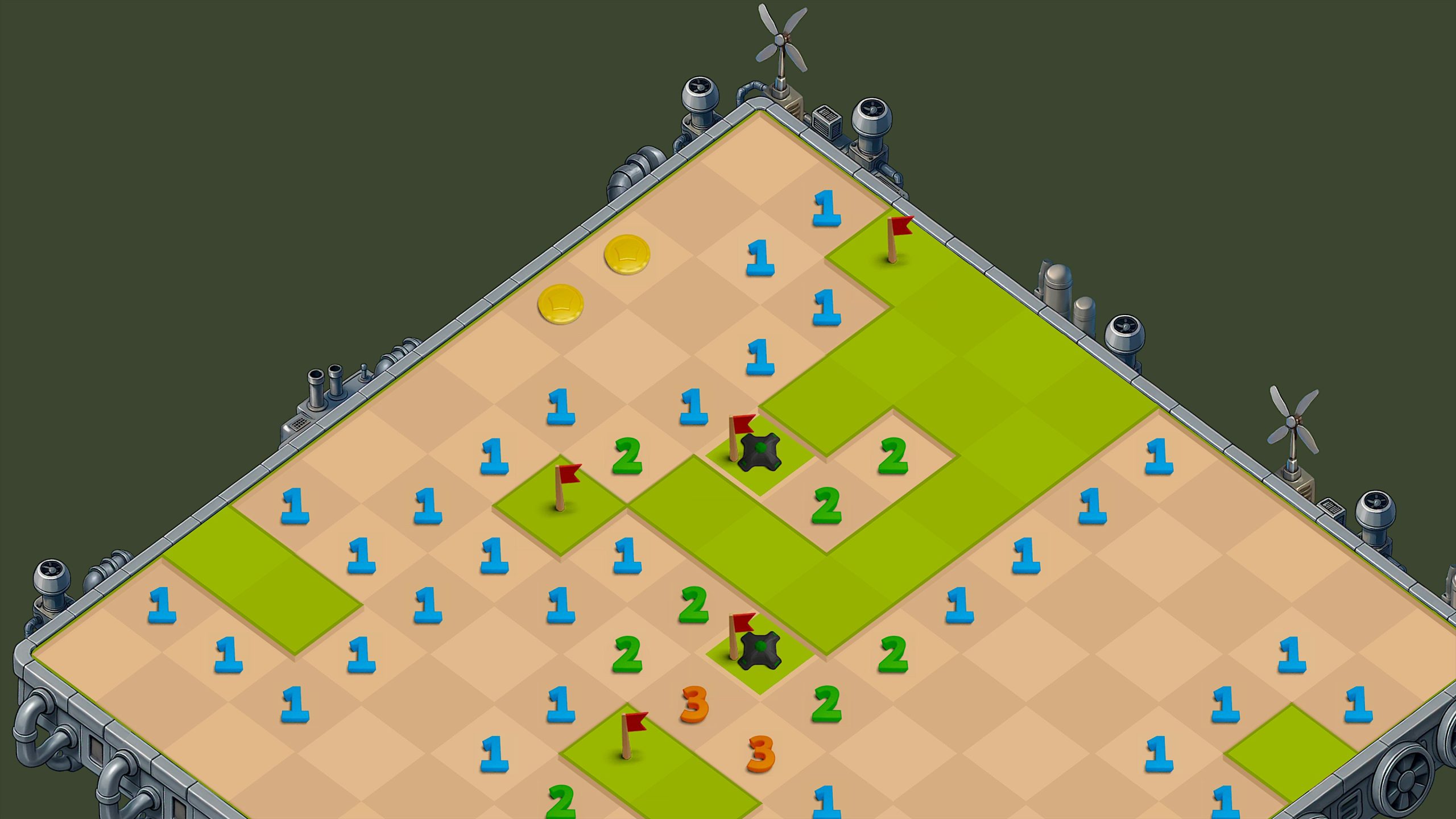
The game keeps the same mechanics that made Minesweeper a classic: a grid with hidden mines and numbers that indicate nearby mines. The modern interface supports both mouse clicks and touch controls, adapting seamlessly to desktop and mobile devices. Multiple difficulty levels ensure that beginners and experienced players can enjoy the challenge equally.
History & Evolution of Minesweeper
Minesweeper originated in early computer gaming and became widely known after Microsoft included it in Windows in the early 1990s. The game challenged players to think logically, click carefully, and use numbers to avoid hidden mines, making it both fun and educational.
Over time, online versions allowed players to enjoy Minesweeper on any device without installing Windows. Google’s interactive version brought the puzzle to search results, making it instantly accessible worldwide while keeping the gameplay faithful to the original.
How to Play Minesweeper
Playing Minesweeper is simple but requires logic and strategy. Follow these steps to get started:
- Open the game – Search for “Minesweeper” in your browser and click Play.
- Click a square – Select any tile to reveal it. The first click is always safe.
- Read the numbers – Each number shows how many mines are adjacent to that square. Blank spaces are safe to uncover.
- Flag suspected mines – Right-click on desktop or long-press on mobile to mark tiles you think contain mines.
- Plan your moves – Use logic and number patterns to determine which tiles are safe. Corners and edges are good starting points.
- Uncover all safe tiles – Your goal is to reveal all safe squares without clicking a mine.
- Increase difficulty gradually – Start with easier grids and advance to harder levels as you get better.
- Practice and improve – Recognise patterns and refine strategies to clear boards efficiently.
Understanding Minesweeper Numbers
Numbers are the key to solving Minesweeper puzzles. Each number represents how many mines are adjacent to that tile. For example, a “2” means there are two mines in the surrounding eight squares.
Recognizing number patterns like “1‑2‑1” or “1‑2‑2‑1” helps identify mine locations and plan safe moves. Learning to read numbers effectively increases your chances of clearing the board and is essential for higher difficulty levels in the game.
Minesweeper Google Doodle Unblocked
Many players wonder how to play Minesweeper when games are restricted at school or work. The good news is that this game is often unblocked because it runs directly through Google search.
You don’t need special websites or downloads — just open a browser and start playing. This version works on desktop and mobile, loads quickly, and allows uninterrupted gameplay, making it a convenient option for quick breaks or casual puzzles.
Game Rules & Strategy Tips
Basic Rules
- Click any square to reveal it. A mine ends the game.
- Numbers indicate the count of mines nearby.
- Flag suspected mines with right-click or long-press.
- Uncover all safe squares to win.
Strategy Tips
Start by clicking edges or corners to reveal more tiles. Use number patterns to locate mines and plan moves carefully. Flagging suspected mines helps avoid mistakes and allows for safer progression. Practicing on higher difficulty levels improves your logic and speed.
Conclusion
The Minesweeper Google Doodle lets you enjoy a classic puzzle game directly in your browser, combining logic, strategy, and fun without downloads. By understanding the numbers, learning the rules, and applying strategic tips, you can clear boards efficiently while enjoying a timeless challenge. Whether at home, school, or work, this interactive game offers quick mental exercises and endless replay value. Try different difficulty levels, flag mines carefully, and experience one of the most enduring online puzzle games that continues to engage players worldwide.
Frequently Asked Questions (FAQs)
Q1: What is the Minesweeper Google Doodle?
The is an online version of the classic Minesweeper game. You can play it directly in your browser without downloads or apps.
Q2: How do I play Minesweeper Google Doodle?
Click a square to reveal it. Numbers show how many mines are nearby, and you can flag suspected mines with right-click or long-press on mobile. The goal is to uncover all safe squares.
Q3: Can I play Minesweeper Google Doodle on mobile?
Yes! The game works on both mobile and desktop browsers, with touch controls for mobile devices.
Q4: Is Minesweeper Google Doodle free?
Yes, it’s completely free to play anytime via Google search. No installation or account is required.
Q5: Can I play Minesweeper Google Doodle if games are blocked at school or work?
Often yes. Because it runs directly in Google search, the game is usually accessible even on restricted networks.




Latest Articles
 Posts ThriftyEvents.net: What Is the Web…In Website
- GlobeInsightBlog Com: Website Features, …In Website
- Arattai App Review: What Makes It Differ…In App
- How to set up the electronics on a fishi…In Automotive
- SYFM Meaning Explained: Is This Texting …In Social Media
- How Much Working Capital Do You Need Acc…In Business
- What Does NM Mean in Text Message? Know …In Social Media
- Best Premium Laptops for Productivity &#…In Tech